Fifine Ampligame D6 Control Pad with 15 Customized Keys And Software for Streaming, Gaming, Video Editing, Office Workflow
Fifine streaming control pad for electronics hardware

Fifine Ampligame D6 Control Pad With 15 Customized Keys And Software For Streaming, Gaming, Video Editing, Office Workflow

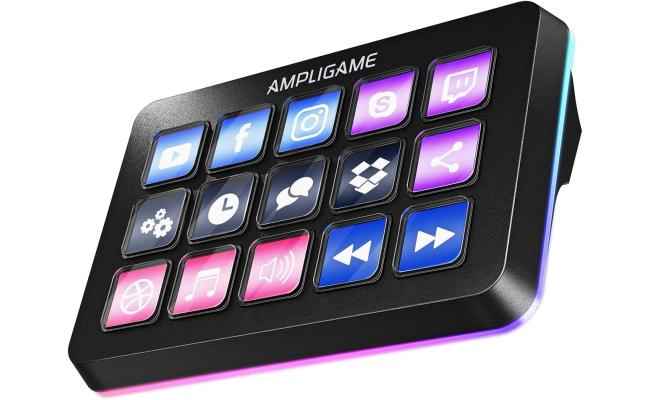
[Customizable LCD Macro Keys] There are a total of 15 customizable macro keys on gaming stream controller, allowing you to create and assign different operations according to your live stream needs. Launch the software or...
SKU: GEN-FIFINEAMPLIGAM-d6487887
Availability: In Stock
Product Type: Audio Accessories
69.000 JOD
69.000 JOD
(-0%)

Delivery across Jordan

Delivery availability and timing depend on stock and destination. Final delivery options are confirmed with your order.

Returns, warranty & support

Need help after purchase? Contact CompuMe for return eligibility, warranty guidance and after-sales support.

Fifine Ampligame D6 Control Pad with 15 Customized Keys And Software for Streaming, Gaming, Video Editing, Office Workflow

Fifine Ampligame D6 Control Pad With 15 Customized Keys And Software For Streaming, Gaming, Video Editing, Office Workflow

69.000 JD

Fifine Ampligame D6 Control Pad With 15 Customized Keys And Software For Streaming, Gaming, Video Editing, Office Workflow

69.000 JD
  • [Customizable LCD Macro Keys] There are a total of 15 customizable macro keys on gaming stream controller, allowing you to create and assign different operations according to your live stream needs. Launch the software or application through a simple finger press, and switch your OBS scenes, control your audio levels, which is very easy and convenient to use.
  • [Wide Application Compatibility] This OBS stream controller has a wide range of software, applications and plugins options whether in the store or download from the computer. They work with OBS Studio, Streamlabs, Twitch, YouTube and more in the stream controller PC. You can also drag-and-drop, set up and download from the console's store, with a very large number of plugins and icons to fill your streaming.
  • [Visual Operation Keypad] After setting and customizing your keys, you can see the application on the touchscreen of stream controller and press to control directly. No need to open plenty of windows/app interfaces on the PC screen, studio controller streaming streamlines your workflow and improves the work efficiency. Let you know your demands having been satisfied with a visual feedback.
  • [Vivid RGB Lighting] In addition to the macro keys on stream controller for gaming having irradiative LCD display, there is a glowing RGB ring around the twitch stream controller, with a total of 9 different controllable and changeable modes. Matching the shortcut button’s look and gaming aura according to your personal preferences, dynamic RGB on video stream controller will give your viewers a more vivid game impression.
  • [Applied in Multi-Tasking Scenes] Whether you intend to use the PC media controller in gaming, live streaming, photography/graphics design, video editing, music creation or office work, the versatile streaming controller makes multi-tasking easier. You can also create folders to generate different programs, and the individual scenes can be processed independently.

You may also like

Recently viewed