Free delivery on orders over 100 JOD
Sat–Thu 10am–9pm | Fri 5pm–10pm




Couldn't load pickup availability
Delivery availability and timing depend on stock and destination. Final delivery options are confirmed with your order.
Need help after purchase? Contact CompuMe for return eligibility, warranty guidance and after-sales support.
If you have too many HDMI devices(such as Roku, PS5/PS4/PS3, Xbox, etc) but want them to connect to a TV with very limited HDMI ports, UGREEN HDMI switch with remote is the ideal solution for you. This professional HDMI switch with 3 ports is suitable for the optimum video transmission of HDTV.


Remote switch via the IR receiver box and easily select the HDMI inputs. You can also press the switch button on the box.

The Blue indicator show which HDMI channel is in use for the moment

Built-in high intelligent chip built inside to assure the performance, switch without delay, no distortion.

Provide Micro USB at power supply for stable video transmission and better performance. (Power adapter is NOT included; Micro USB cable is included)

To ensure the definition of 4K@30Hz, please use the HDMI 1.4 cable under 8 meters(26FT); The HDMI switch does not support HDMI 2.0. If connect with PS4 and Xbox, please set the TV display in HDMI 1.4.
For power-hungry devices, the power supply is required. Don‘t support Automatic Switching.

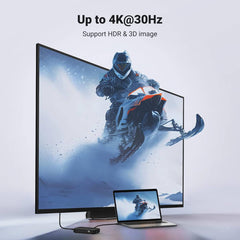
This HDMI Switcher has a built-in high-performance chip, and delivers video at the resolution of 4K@30Hz, 2K@60Hz, 1080P@120Hz, 3D, providing stunning 4K video for you.

Q1: What can I do if the remote cannot work?
(1) Before using the remote, please Remove the Little Transparent Piece first, which is used to reduce battery consumption during the storage and shipping process, and connect the infrared control cable with the item.
(2) The distance and the angle of the Infrared Control Cable and the remote should be within 16ft, and 45 degrees respectively.
(3) When using the remote control, it should be directly facing the receiver and there are no objects blocking it.
Q2: How can I troubleshoot if I cannot get any signal when using this switch to PS4 Pro/PS5/Xbox to a 4K/60Hz monitor?
(1) Connect the PS4 Pro/Xbox to the TV directly, and manually lower these devices' resolution first. Then connect them to the switch.
(2) Or you can set the HDMI version of your TV as HDMI 1.4. You can also connect the switch to the HDMI 1.4 port of your TV directly without any settings.
Thanks for subscribing!
This email has been registered!

| Product | SKU | Description | Collection | Availability | Product Type | Other Details |
|---|